
Appearance
The labs — everything, locally
deploy/labs/ runs the product with every service it can talk to, so a flow can be walked end to end — SSO, uploads, checkout — without an account anywhere and without a single value to configure:
bash
docker compose -f deploy/labs/docker-compose.yml up -d --buildWithout the repository
The same stack runs without any source tree: a standalone compose file — the published, signed image instead of a local build, the Dex config inlined — is served at govuekit.dev/labs/docker-compose.yml:
bash
curl -fsSLO https://govuekit.dev/labs/docker-compose.yml
docker compose up -d
What you run this way is the compiled kit; the licence buys its source, this labs setup included. Everything below applies to both variants.
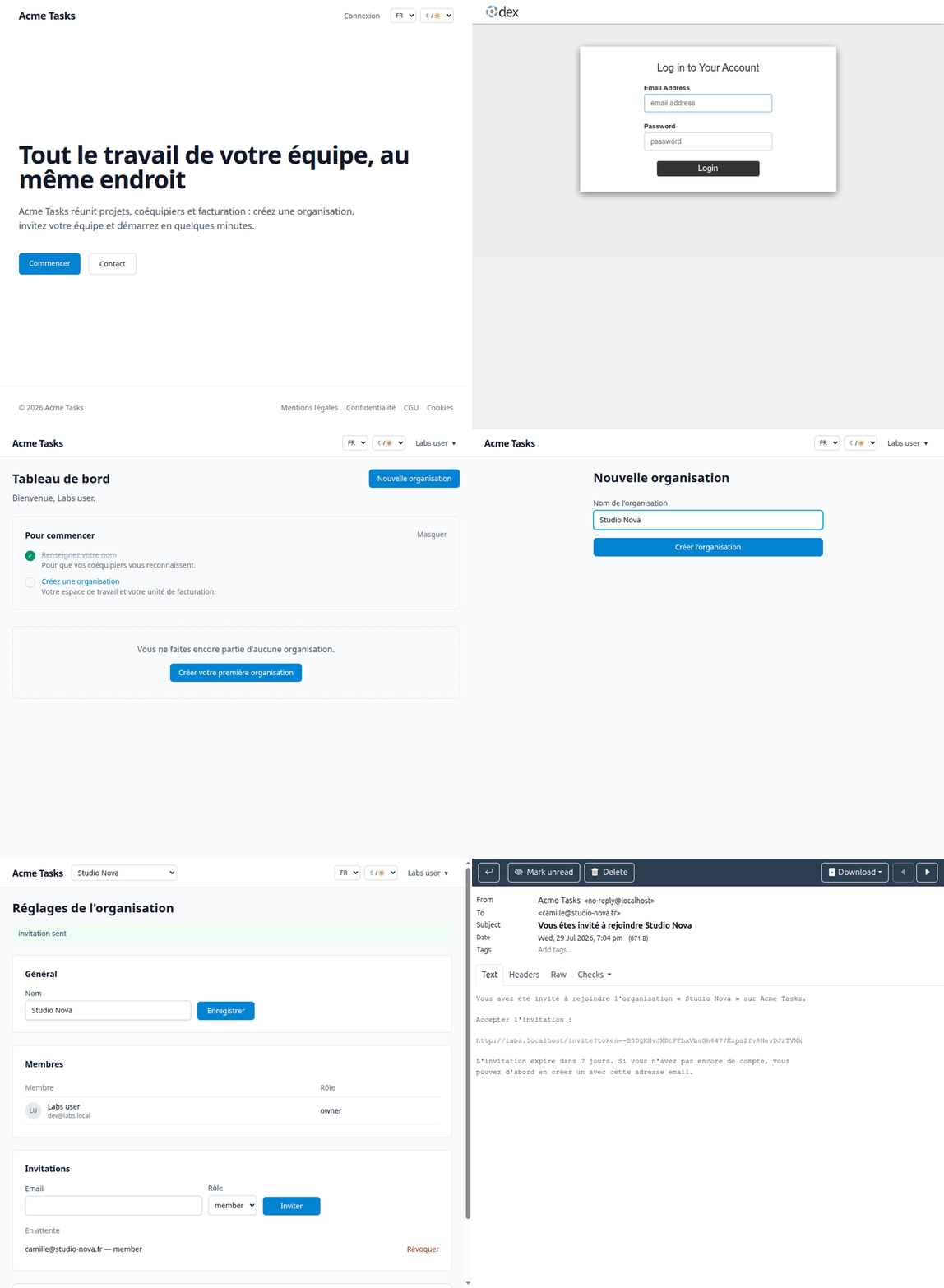
| URL | What |
|---|---|
http://labs.localhost | the app |
http://mail.labs.localhost | Mailpit — every mail it sends |
http://auth.labs.localhost | Dex (OIDC) — sign in as dev@labs.local / labs |
http://s3.labs.localhost | MinIO console — labs-minio / labs-minio-secret |
Behind them: PostgreSQL, and stripe-mock answering billing calls with fixtures.
Why it needs nothing from you
No domain, no certificate, no /etc/hosts: *.localhost already resolves to your machine, and the containers reach the same URLs through network aliases on the local proxy — which matters, because an OIDC issuer has to be one URL for both the browser and the server. Port 80 is the only one taken on the host.
Every credential is a constant in the compose file, on purpose: the stack is disposable and never leaves the machine. It runs APP_ENV=development, the only mode where the kit accepts a plain-http OIDC issuer.
bash
docker compose -f deploy/labs/docker-compose.yml down -v # wipe it allA tour worth taking
- Sign in with Continue with Dex — the SSO round trip, on your machine.
- Create an organization, invite a teammate — the invitation lands in
mail.labs.localhost, in the inviter's language. - Upload an avatar — it goes through the S3 path into MinIO; check the bucket in the console.
- Open the billing page — plans render, checkout calls hit stripe-mock.
- Set
SUPER_ADMIN_EMAIL's account and restart to see/admin: MRR, ARPU, churn, moderation, audit log.
Two limits worth knowing
- stripe-mock emits no webhook. To rehearse fulfilment, put real Stripe test keys in a
.envnext to the compose file and blankSTRIPE_API_BASE— the Stripe guide walks through it. BlankSTRIPE_SECRET_KEYinstead to see the app as a deployment that never configured billing. - The network subnet is pinned to
172.16.238.0/24so the hardened outbound client can allow it explicitly (EGRESS_ALLOW_PREFIXES). Change both together if it clashes with something local.